The platform
Eight parts. One database. No handoffs.
Each of these is a product other companies sell on its own. The reason ours are worth having together is that they share one record of the customer, so nothing has to be copied, exported or remembered.
Before the list
The eight parts, working as one system.
Our own live system moving — the caller, the content engine, the CRM, the website and the tools — before the list below takes them one at a time.
Website & search
A site that looks the part and produces the business
We build and host the public site, and it is wired into the same system as everything else. Property search a visitor drives in plain English, not just a filter panel. Valuation pages — for what a home is worth and for what it would rent — that trade something useful for a name. A landing page per campaign so ad traffic never lands on a generic home page.
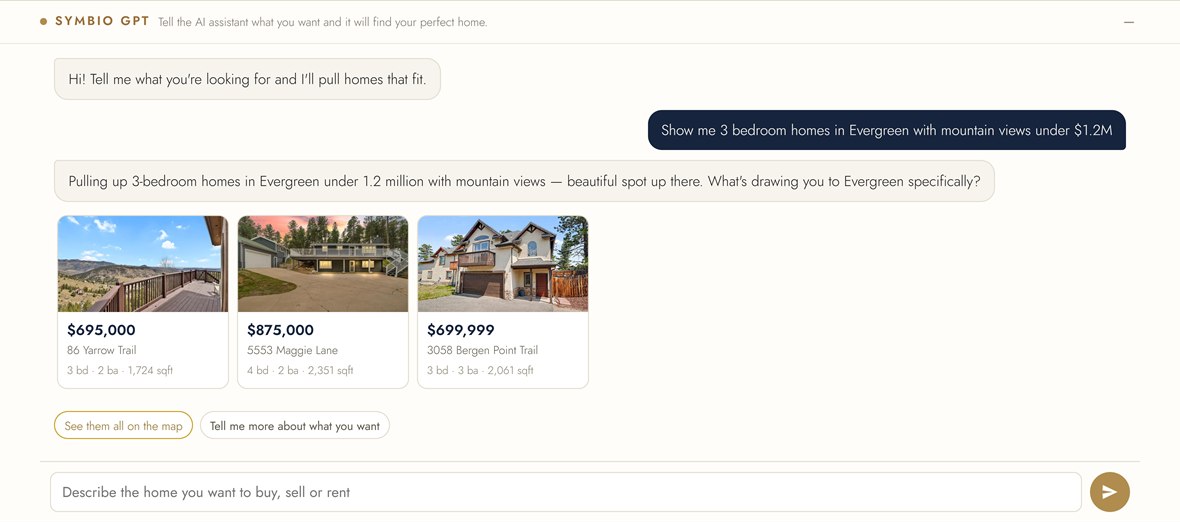
- Live listing search with saved searches and alerts, so a browser becomes a returning visitor. A visitor can also just say what they want in plain English and the assistant answers with the homes that fit.
- Instant home valuation and seller report pages that capture the lead and start the follow-up automatically.
- Rental valuation for landlords — a projected monthly rent range built from recently leased comparable homes, handed back as a shareable report and captured as a lead of its own.
- Campaign landing pages matched to what the ad promised, built as fast as the campaign needs them.
- A newsroom that fills itself — see the content engine below.
- Fast and indexable: server-rendered pages, real sitemaps, and structured data so search engines and AI assistants can read the site properly.
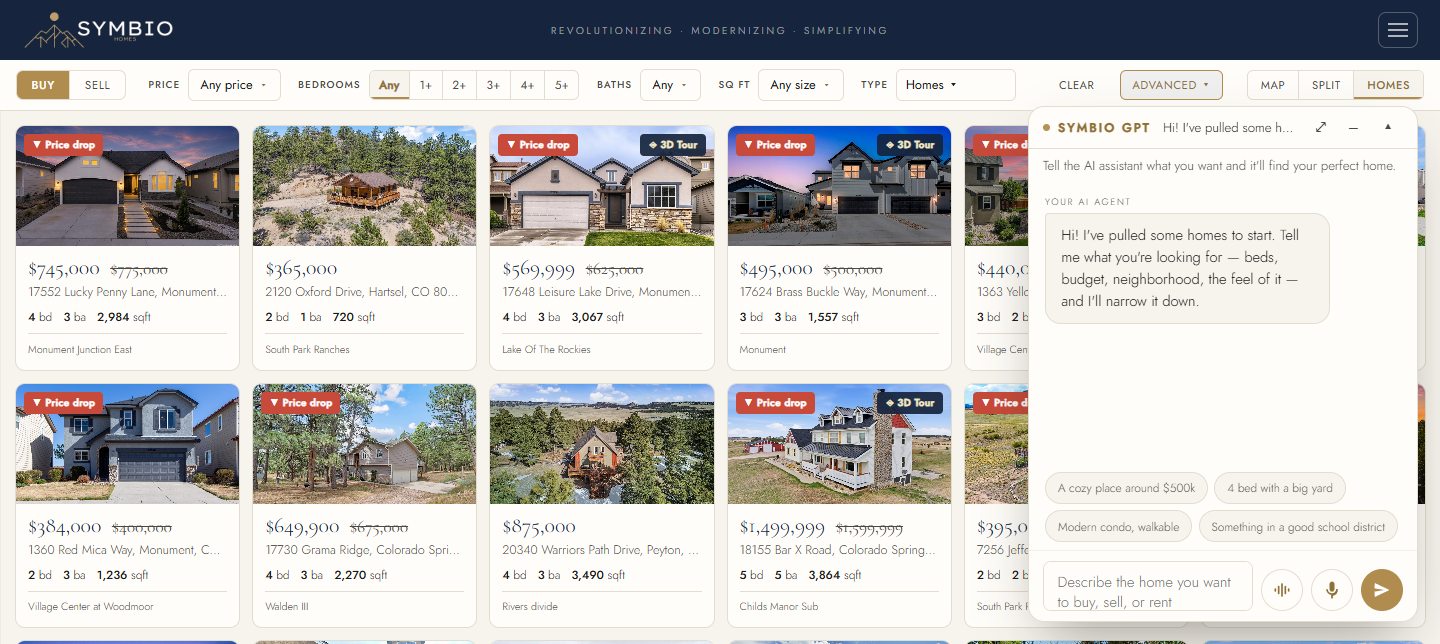
Slide the picture sideways to see it at a readable size.
The AI CRM
It decides who gets the lead and what happens next
A CRM that only stores things is a filing cabinet. Ours reads every signal a lead produces — which listings they opened, whether they answered, what they said to the AI — and turns that into an order of work and an owner.
- Routing rules you set: by source, by area, by price band, round-robin or by performance — assigned the second the lead lands.
- Scoring from behavior, not from a form field, so the list your team works in the morning is the right list.
- Action plans that enrol on their own and stop the moment a human takes over.
- One timeline per person: every call, text, email, page view and document in one place.
- Team visibility for whoever runs the business, without asking anyone to file a report.
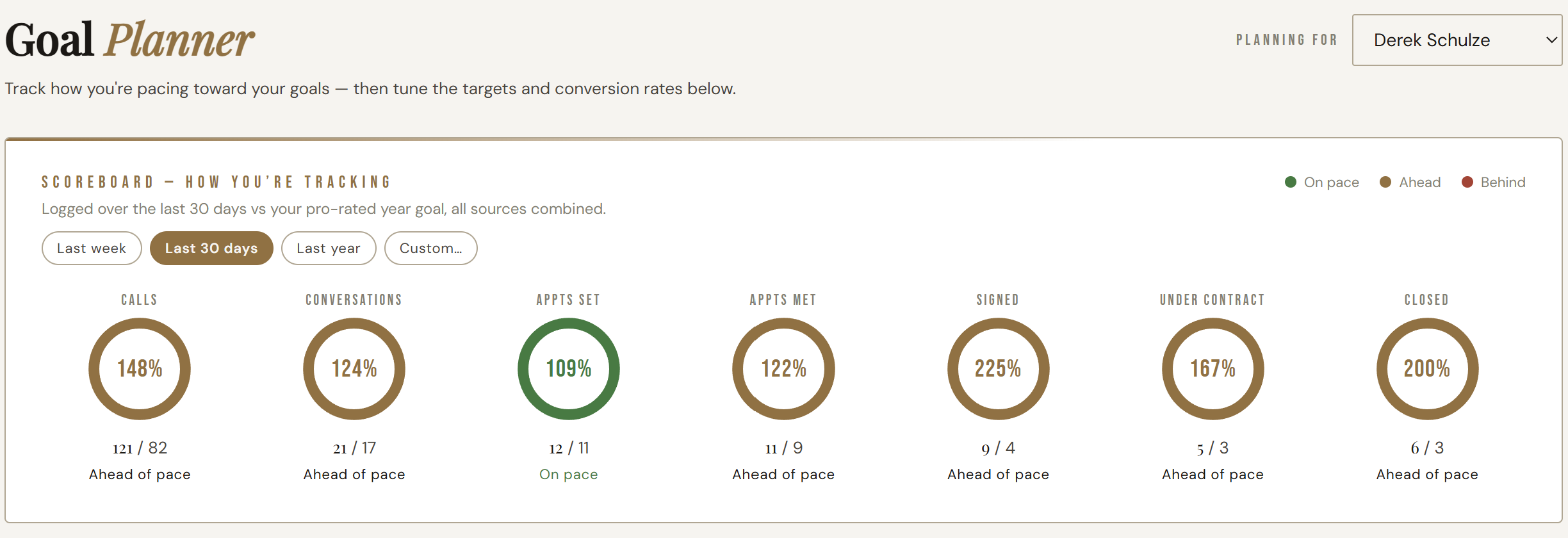
Slide the picture sideways to see it at a readable size.
AI dialer
Conversational calls that book real appointments
Not a robocall and not a voicemail drop. A caller that holds a genuine conversation, handles the objection it just heard, and books into the same calendar your team already lives in — then writes the whole call back onto the lead.
- Works a list — new leads, aged leads, expireds, past clients — on the schedule you set.
- Books straight into the calendar, checking real availability rather than promising a slot that is taken.
- Hands off to a person the moment the conversation calls for one.
- Recording, transcript and summary attached to the lead, so the agent who takes the appointment already knows the story.
- Compliance built in: do-not-call and opt-out handling are part of the dialer, not a policy document.
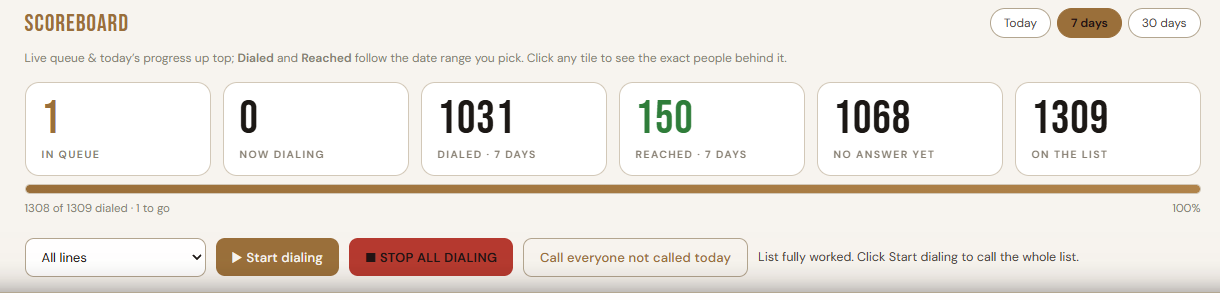
AI texter & follow-up
The half that actually converts
People answer texts. The texter picks up a new lead within seconds of it arriving, asks the two questions that qualify it, and keeps the thread alive for as long as it takes — which is usually far longer than a human team keeps going.
- Answers in seconds, at any hour, which is most of the reason speed-to-lead numbers move.
- Long-horizon nurture: a lead that says "not until spring" is picked up again in spring, by itself.
- Email and text in one sequence, so the follow-up is a conversation rather than a newsletter.
- Stops instantly on a reply that needs a human, an opt-out, or a booked appointment.
Slide the thread sideways to see it end to end.
Content engine
Your site and your feeds, published every day, without a marketing hire
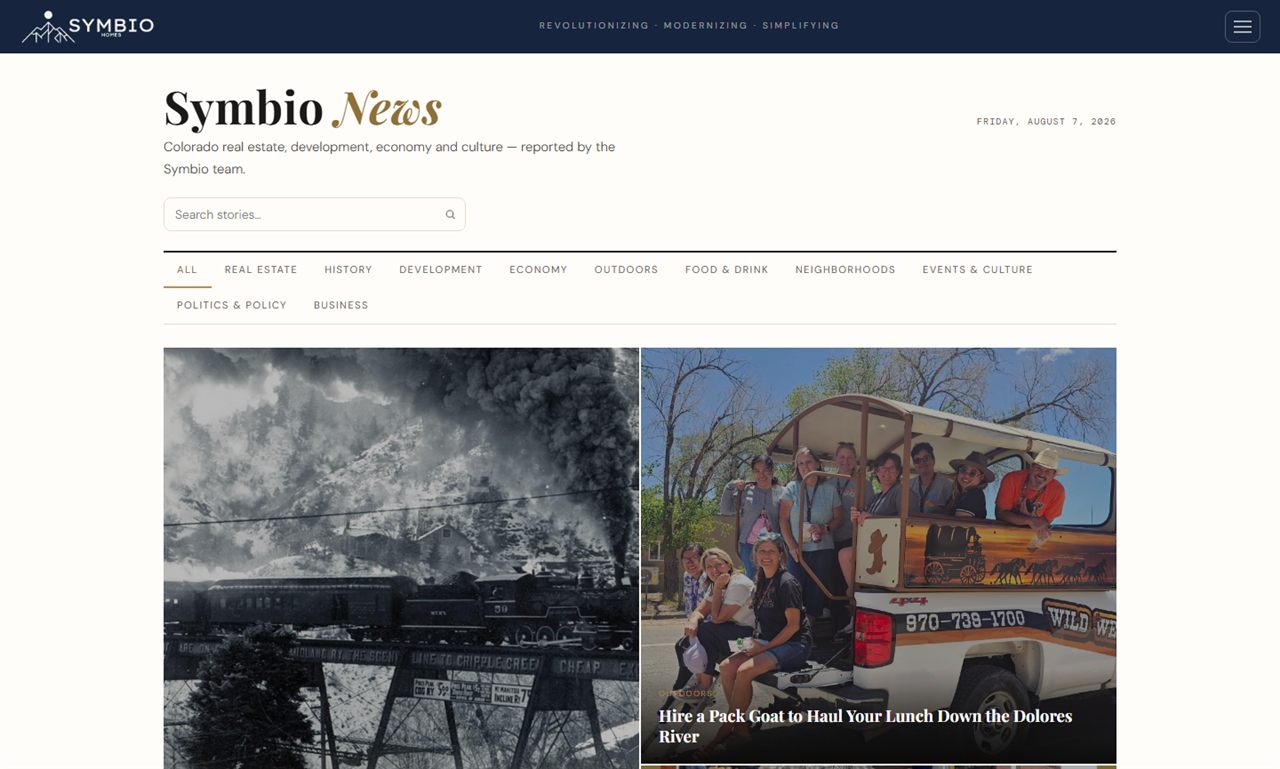
The single most common thing we see is a good website that has not been added to in a year. The content engine writes and schedules to it daily — on your brand, about your market, linked to your listings.
- A daily article to the newsroom: market movement, explainers, and the questions your buyers and sellers actually ask.
- Listing and price-change posts, styled properly rather than a bare photo dumped into a feed.
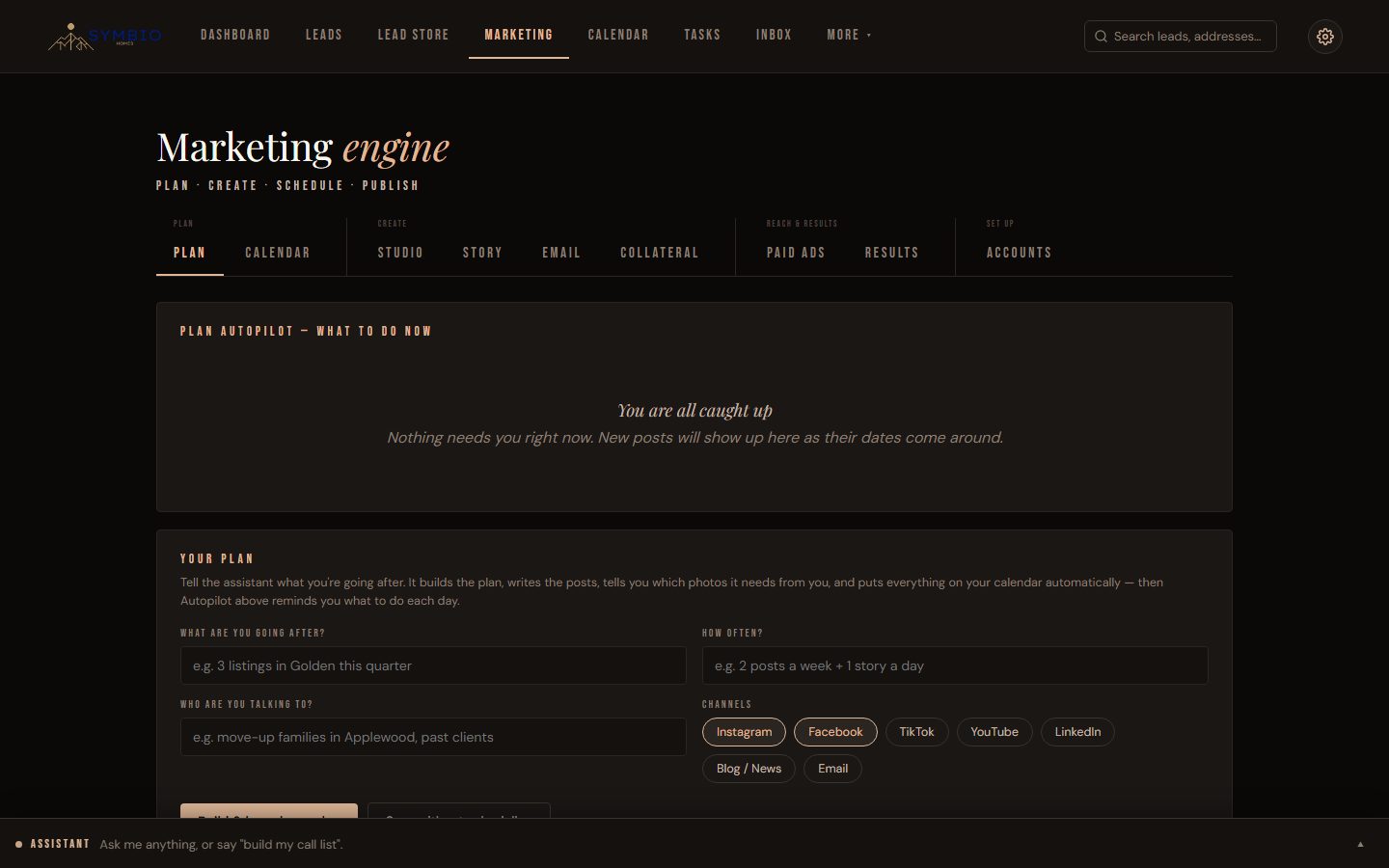
- Scheduled across channels — the major social platforms and your business profile — from one calendar.
- Short video and graphics generated from listing media with your logo and type on them.
- You keep the veto: everything can be reviewed before it goes out, or left to run.
Slide the picture sideways to see it at a readable size.
Paid ads & attribution
Spend judged on what it produced
The ad platforms report clicks and cost per lead. They cannot tell you which of those leads answered the phone, booked, or signed — because they never see your database. Ours is the same database, so it can.
- Campaigns built and maintained on the platforms that matter for your market.
- Every lead carries its source from first click to closed file.
- Budget reviewed on a schedule, against outcomes rather than impressions.
- Hard ceilings: spend limits are set by you in writing and nothing raises them on its own.
Slide the diagram sideways to see both ends.
Reports, presentations & documents
The paperwork end of the job, generated rather than assembled
The parts of the week that quietly eat a day: the listing presentation, the valuation, the proposal, the agreement. They are produced from live data and sent, instead of being rebuilt in a slide deck each time.
- Valuations and comparative market analyses from live market data, branded to you.
- Listing and seller presentations generated per property, ready to present or send.
- Client-specific proposals assembled from your own service list.
- Agreements and disclosures sent for signature and filed back on the record automatically.
- Client portals so the customer can see their own search, documents and updates.
Slide the diagram sideways to see the whole loop.
Booking, calendar & the data layer
The calendar and data that make everything else work
An AI that books appointments is only useful if it is booking into the calendar your team really uses, and a prospecting system is only useful if the list underneath it is real.
- Two-way calendar sync with the calendar your team already has, so availability is genuine.
- Public booking pages per person, used by the AI and by customers alike.
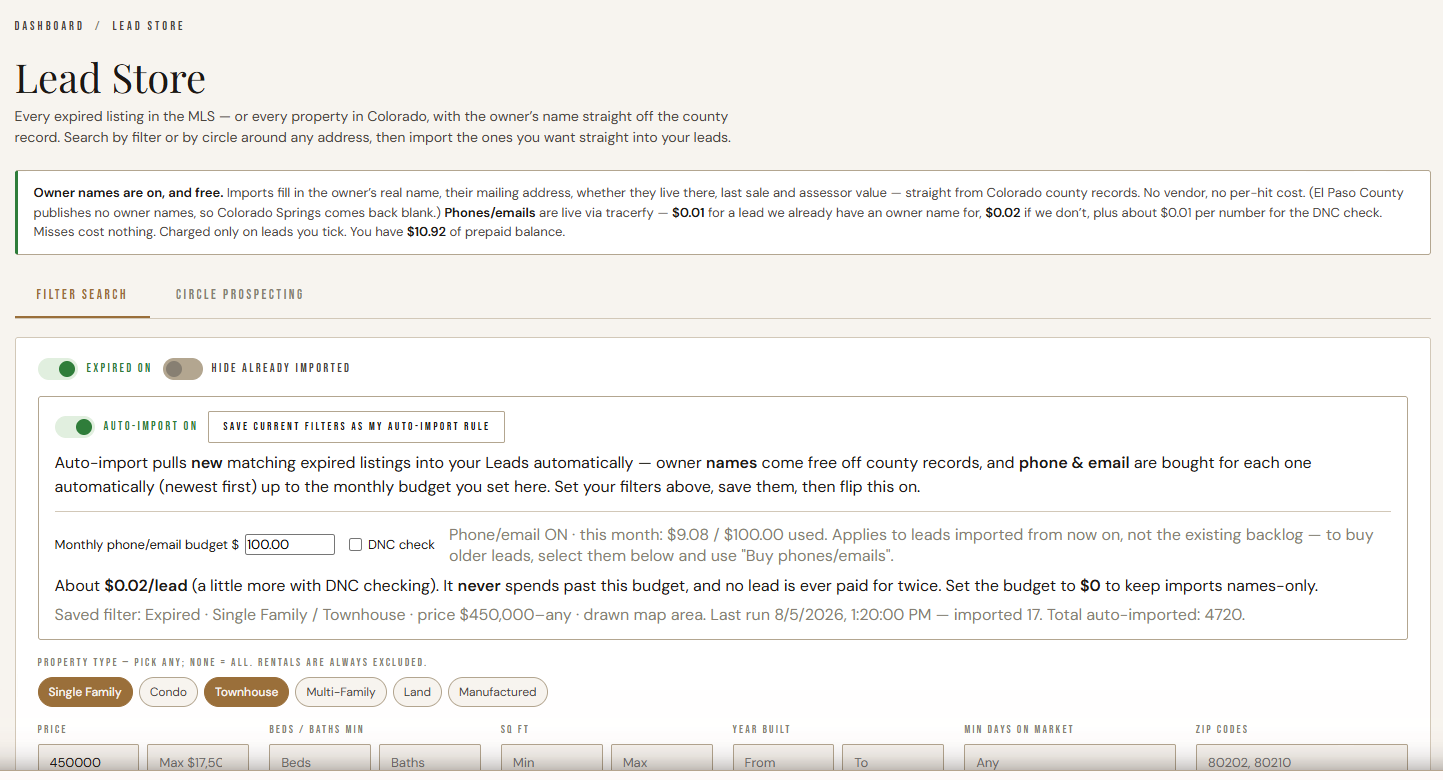
- Prospecting lists — expireds, circle prospecting around an address, past clients — built into the CRM rather than bought as a separate subscription.
- Owner and contact enrichment, with paid lookups kept strictly on-demand so costs never run by themselves.
- Imports and de-duplication so an existing database moves in cleanly.
Slide the picture sideways to see it at a readable size.
For mortgage businesses
The same eight parts, arranged around a loan instead of a listing.
There is a whole page on the lending side — the five stages of a loan, how an enquiry is routed the second it lands, and where this stops and your loan origination system starts.
A lender’s problem is not really a different problem. The enquiry still has to be answered in seconds, worked for months, and credited to whatever produced it — and the CRM most loan officers are given was built for a different job. What changes is what each part is pointed at.
Website & search
A site that produces borrowers
Rate and payment tools, application starts and calculators that trade something useful for a name — with the enquiry landing in the same system that follows it up.
The AI CRM
Routing across loan officers
By source, area, product or performance, decided the second the enquiry lands rather than in the morning meeting.
AI dialer & texter
Answered in seconds, at any hour
The texter picks up a new enquiry immediately and the AI caller works the list — which is most of what decides who gets the loan, rather than the rate sheet.
Content engine
Your blog and your social, written and scheduled
By the same engine that writes our own newsroom — so a lending brand stays visible without a marketing hire.
Paid ads & attribution
Spend priced on what a loan is worth to you
Not a generic cost-per-click. What you spend is judged against the enquiries it actually produced, rather than against clicks.
Reports, presentations & documents
The paperwork end of the job, generated rather than assembled
Proposals assembled from your own service list, and agreements and disclosures sent for signature and filed back on the record automatically — rather than rebuilt each time and left as a file on somebody’s desktop.
Booking, calendar & the data layer
The calendar and data that make everything else work
Two-way calendar sync with the calendar your team already has, public booking pages used by the AI and by customers alike, and imports and de-duplication so an existing database moves in cleanly.
Built into the sender
Consent, do-not-call and opt-out
Rules the machinery enforces, not a policy document somebody is trusted to remember.
Where it meets your stack
It hooks into the pricing engine you quote from
And into the tool you bring applications through. Your loan files stay where your processors work; what we connect to is the pricing and the application start, so an enquiry turns into a real application without ever leaving the conversation.
And if you run both sides — a brokerage and a lending arm — it is one database. The buyer your agents are working and the borrower your loan officers are working are the same person, not two records in two systems that never speak.
Underneath all of it
Built on the same infrastructure we bet our own business on.
Hosted at the edge so pages are fast everywhere. One database with row-level permissions, so a team member sees exactly what they should. Automatic backups. Changes shipped continuously rather than in a yearly release. None of this is something you have to manage — we run it — but you should know what it is standing on.
AI-powered — without the learning curve
See what AI can do to save you time — and go from eight subscriptions to one.
That is the conversation. Tell us what you run on today — the CRM, the dialer, the ad tools, the eight logins your team juggles — and we will show you how Symbio replaces them with one AI platform that does the work for you. Powerful enough to run your whole business, simple enough to use on day one.
See how packages are built, or reach us directly at Support@symbiohomes.com / (720) 955-7770.